

A Woocommerce Case Study
See how we took a complex application from a 17k+ per month cost to 4.5k while at the same time tripling performance.
It’s just wordpress right?

That’s what I was thinking when I first saw this site. Why was it so slow? Then I saw the staggering AWS bill, over 17k per month! So what was going on here?
The Application
Well for one, it wasn’t just wordpress, there was a nodejs frontend. There was also another wordpress install, a custom API and several database sync processes running on ECS. The main woocommerce platform was highly customized to fit not only a niche business model but also to service as the datasource for the nodejs frontend. The additional wordpress install was a site that mostly idle, but would get bursts of traffic around once a quarter. The data sync processes were a mixed bag of always on ECS containers and scheduled ECS processes.
Due to the highly customized nature of the woocommerce platform the caching plugins that can normally make wordpress more scalable didn’t play nice which caused a lot of strain on the database.
The Environment
The existing environment was the typical AWS build that an application developer would do. Essentially AWS was treated as a virtual host. When there was a bottleneck the go to solution was to add more resources. The entire project was worked on by four different agencies, all maintaining different parts of the application and managing their own parts of the infrastructure, so no one really had a full understanding of all the individual parts.
The main bulk of the cost and resources were dedicated to RDS. A huge serverless cluster with 32 core minimum with a reader and several smaller ones including some for development and postgres DB’s that ran some of the data sync processes.
The application resources were monolith ec2 instances, no frills installs that were sized for peak usage. There was a c5.9xlarge running the main application, so an older generation of server, and quite massive. The was a c5.6xlarge as well, and the nodejs app had both a nginx server and a dedicated nodejs instance. A lot of single points of failure.
The data sync processes on ECS would have some always on constantly checking data and some scheduled processes. While investigating these it was found that several were defunct or just outright erroring as there was no monitoring in place. There were also a couple of scheduled processes that were constantly overrunning each other because as the data size grew they could no longer complete in time before the next scheduled job started. One had a massive memory leak and would die off and be reborn every 30 minutes or so. There was also a standalone API running on ECS.
The build pipeline was basically non existent. There was a staging and production environment, but because the teams were all working differently there was major drama for every build, reconfigurations for testing and frequent breaking production changes being introduced.
The Build
Our new infrastructure build had the following objectives.
- Reduce Cost
- Improve Performance
- Streamline the developer experience
- Increase redundancy
- Increase resiliency
- Improve scalability
The solution to these problems primarily revolved around consolidation of workloads in AWS Elastic Kubernetes Service. A cluster was created for production and one for staging.
Kubernetes to the Rescue
A nodegroup was created using c8g.2xlarge instances for CPU bound workloads, essentially anything doing processing of user requests, which included php and nodejs workers. These workloads were provisioned as a daemonset across all nodes in this cpu centric nodegroup. What this allows for is that all these cpu intensive pods to get spread out across all the nodes in this nodegroup. The cpu usage then automatically level sets itself and allows aws to handle the autoscaling without needing HPA. In this way you won’t end up with too many “hot” pods to ever be on a single node.
The next nodegroup was for the other services, things that were more memory bound, some needing their own attached storage. Things like redis, nginx, data sync processes, and our github actions container would run here.
This gave us our scalable infrastructure to build on, it created the redundance, resiliency and scalability we needed. We could scale this down at night and back up in the morning as the business primarily only received orders during business hours and would sometimes send marketing emails that would burst traffic early in the morning. This got us part of the way to cost reduction as well, we no longer had to size for peak and all those ECS containers could be moved into the idle resources of the EKS cluster.
The elephant was still in the room though, the 32 vcpu database…
The Database Problem

Those 32 vcpu databases were an absolute cost destroyer. While the database was overprovisioned at 32 vcpu, it wasn’t that overprovisioned. During push events it definitely was using up to 80% of those resources, and was still struggling just due to the amount identical queries it was running. The primary reason is simply due to the way wordpress works. There’s basically no native caching, it goes to the database for everything and as mentioned before, caching modules were introducing other errors. It could be seen in the DB performance insights that it was mostly small queries, which sometimes were running thousands of times a second and the database was processing them all as if it just didn’t do it a few milliseconds ago.
Query caching has been long gone in MySQL, and in a database this active could also fail due to query cache locks anyway. There’s another way to cache queries though, ProxySQL. We implemented ProxySQL and set rules to cache our most frequent queries. The ones that were being called thousands of a second for only 5 seconds. Even with that short cache time, the results were huge. From a database that was often running at 24 cores were were able to lower it to 5.
That wasn’t the end of the ProxySQL optimization though. The ProxySQL admin was connected into our Grafana instance running in the cluster and dashboards were created to flush out the most costly queries. Combined with RDS performance insights we began to optimize the queries themselves.
Some of these queries we had ProxySQL rewrite on the fly. These were primarily ones that were doing join logix in the where clauses of the SQL. Or using like clauses for searches where a static value would suffice. We also had a reader db which was only there for redundancy and was sitting idle just begging for something to do. We offloaded the most costly and frequent select statements to the reader. It took some time in staging to make sure we didn’t introduce any race conditions, but after all this was done we lowered the vcpu minimum of the database to 2.
The total cost savings of all this was a 13k reduction which exceeded our original goal and estimate of 10k.
Deployment Pipelines that Work
As mentioned before there were no actual pipelines. When a deployment was done there would always be some downtime, and rolling back was also a pain. In the kubernetes was, we implemented a blue/green deployment model for everything. We would always have two versions of code running, we would just switch where our nginx svc would point to for an instant and zero downtime deployment. If there was a problem, switching back was a click away.
Since all the codebases already in github we created a self hosted github runner inside the cluster itself. That runner could build the code, compile it into containers and had all necessary permissions to upload the container to the container registry and relaunch our pods with updated container images.
As work was nearing completion on the cluster though some other things were becoming apparent, the way the teams were developing their projects needed additional environments. We needed a steady state staging cluster, but due to other integrations you could never have proper data. The frontend nodejs application needed to be tested against the production backend before release. We were getting requests to change backend locations every couple days depending on who was testing what. It’s clear we needed additional environments.
You Get an Environment! And You Get an Environment!
Environments for testing are cheap in kubernetes since they are mostly idle. So We spun up another development backend and just made a new database inside of the existing staging one. Then a new frontend to point to that.
Now we had:
dev frontend -> dev backend
staging frontend -> staging backend
production frontend -> production backend
Not good enough though, since the frontend team would need to connect to the production backend, we need one more:
dev frontend -> dev backend
staging frontend -> staging backend
uat frontend -> production backend
production frontend -> production backend
No more switching backend locations.
But wait, one more thing we can do, staging has plenty of idle resources. Feature branches are implemented as well. If you prefix your branch with feature, hotfix or bugfix, upon push it will automatically provision a new frontend. You can point that to your desired backend. Now we can do adequate smoke testing on these branches before we do a merge.
The Results
The initial build out took about month, despite being off some time for the holidays. Costs started increasing in early December as we started provisioning resources. The cluster went live on December 28th, where you can see the usages started changing. Initially we saw some overuse of EFS that needed to be mitigated. Then a careful scale down of the database and migration of the services in ECS to a steady state around Jan 20th. There were a few major events in March which really proved the system could handle whatever we could throw at it. In load testing the load tester itself failed before there were infrastructure problem. In April we enabled the latest ProxySQL rules for offloading select load to the database reader.
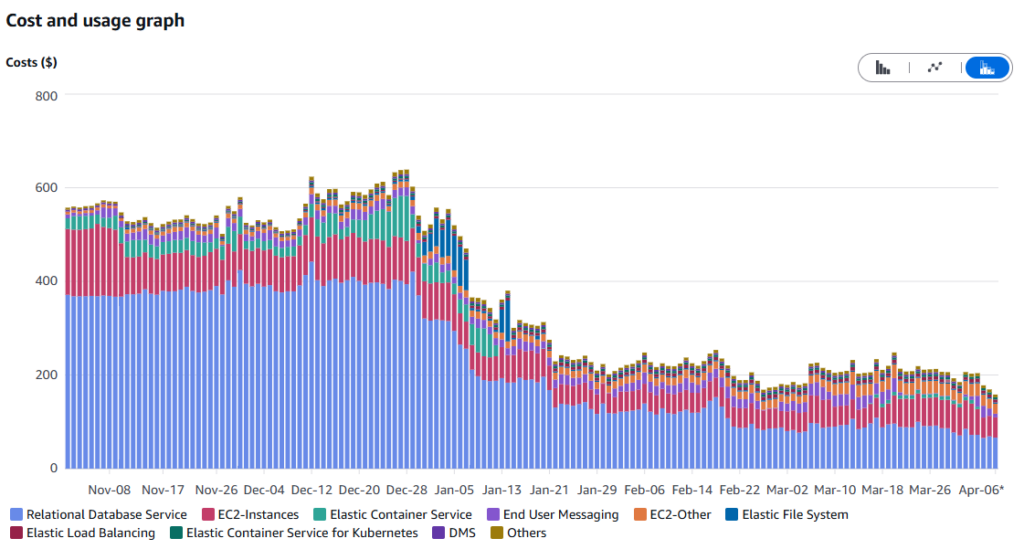
While there’s still some things left to do, such as purchasing of a savings plan the results speak for themselves. The entire project paid for itself in 2 months. Developers are saving time by not being hamstringed with having to reconfigure environments for testing. And you can’t put a price tag on having the peace of mind that your releases are not going to incur unnecessary downtime and your code has been properly tested before release.